You would happily take a job in the next town. Your website barely mentions it. So someone suggests adding a page for every town within driving distance.
It sounds tidy: more towns, more pages, more chances to be found. But a stack of pages with the place names swapped can give customers very little help and leave you with a surprisingly large maintenance chore.
Create a town-specific page when it helps someone in that town make a better hiring decision. Otherwise, a clear service-area page may do the job. Here is how to choose without turning your website into a town-name collection.
First, separate where you are from where you work
A location page describes an actual business location. Depending on the business, it might include an address, customer-facing hours, parking information, directions, and the services available there.
A service-area page describes somewhere your team travels to serve customers. It should explain availability and coverage without suggesting you have an office or storefront there.
That distinction matters. A homeowner looking for a plumber needs to know whether you will visit their address. They do not need directions to an office that does not exist.
If you work from a private home and do not receive customers there, do not publish that address simply to make a town page look more local. Be clear about the area you cover instead.
Choose between three sensible approaches
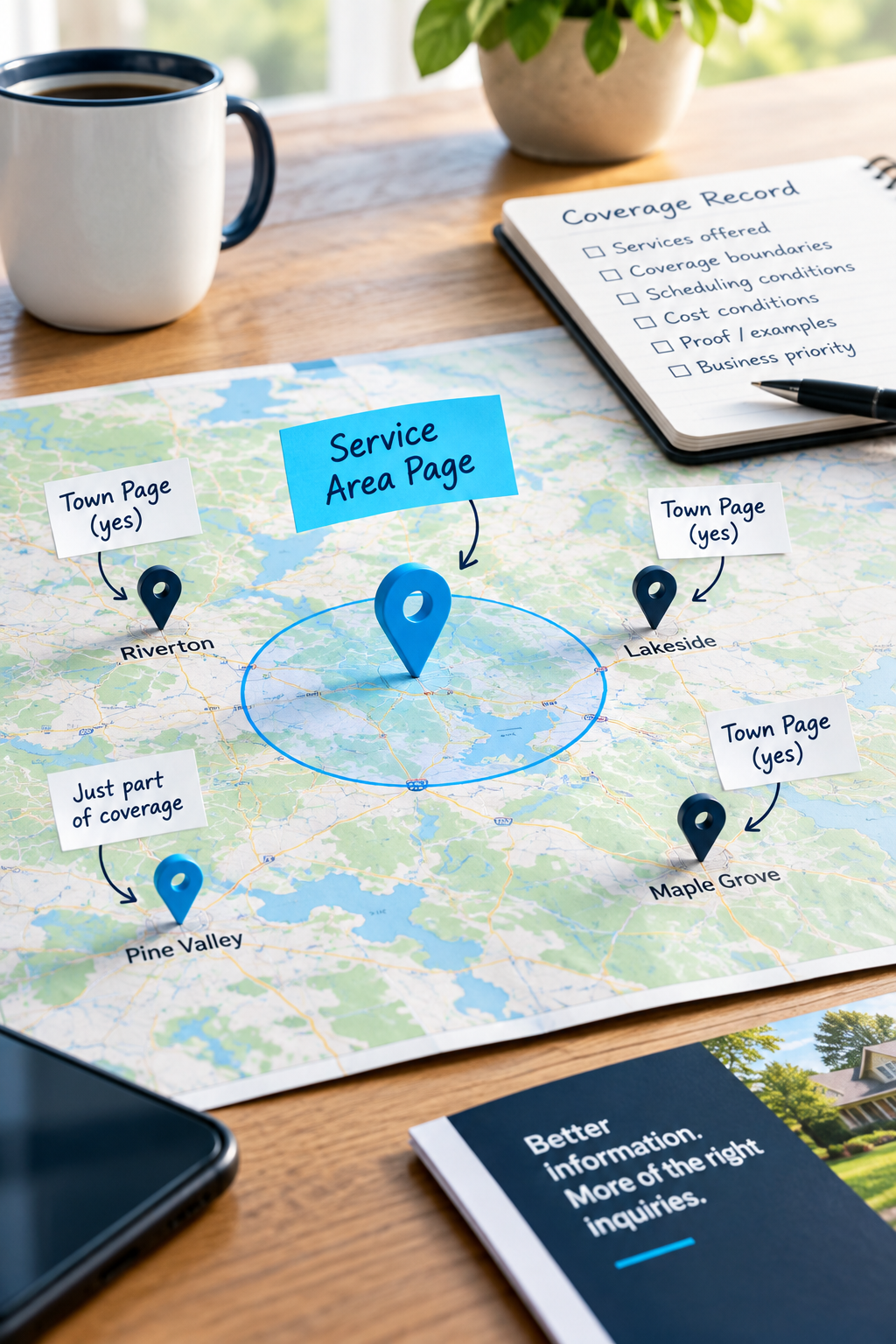
One service-area page
Start here if your services, scheduling, and terms are broadly the same across a compact region. List the places you regularly serve, explain any boundaries, and give customers a way to check an address near the edge.
For example, a cleaning company might explain that it serves three neighboring towns, offers the same recurring cleaning service throughout, and checks availability by postcode. Three separate pages may add nothing useful.
One service-area page plus selected town pages
This makes sense when certain places have meaningful differences: different service availability, travel charges, scheduling arrangements, or enough relevant local work to answer specific buyer questions.
The main service-area page provides the overview. Individual pages handle the detail where it earns its place.
Pages for genuine business locations
If you operate multiple customer-facing branches, each branch may need its own page because customers need different directions, hours, contact details, and service information.
Do not mix these up with areas you merely travel to. A service radius is not a branch network.
Make a coverage record before you commission pages
Ask whoever handles scheduling or quotes to help document where you actually want work. Marketing ambitions and Tuesday afternoon travel times are not always friends.
For each potential town, record:
- Services offered: Everything you sell, or only certain jobs?
- Coverage boundaries: The whole town, certain postcodes, or addresses assessed individually?
- Scheduling conditions: Regular visits, selected days, or availability confirmed after inquiry?
- Cost conditions: Any travel charge or minimum job requirement that customers should know before requesting a quote?
- Evidence available: Relevant completed work, permission-cleared photographs, or an authentic customer review?
- Business priority: Do you have capacity and a practical reason to seek more work there?
This record does not all have to appear on your website. It does need to guide what the website promises.
Give each proposed town page a reason to exist
Before approving a page, ask: What can we tell a customer here that our existing service pages and coverage overview do not explain well enough?
Useful answers might include:
- A particular service is available there, but another is not.
- Your team groups appointments in that area on specific days.
- Access arrangements commonly affect how customers should prepare for a visit.
- You have relevant project examples that show how you handle the work customers there need.
- Customers regularly ask whether you cover a particular boundary or outlying community.
Only include details that are true for your business. Do not invent local challenges or imply special expertise because a place has older houses, steep streets, or a well-known landmark.
If the only difference is the town name in the heading, keep that town on your main coverage page for now. There is no required word count that turns an unnecessary page into a useful one.
What a useful town page could look like
Consider a fictional landscaping company expanding its maintenance route into a nearby town. This is an illustration, not a client example or a claim about results.
A clear opening
Instead of “Your trusted local landscaping experts,” the page could open with: “Garden maintenance in Oakfield. We offer recurring mowing, hedge trimming, and seasonal tidy-ups for residential properties in Oakfield. We do not currently offer tree removal.”
That tells a visitor what is available and filters out a service the company does not provide.
The practical conditions
If accurate, the next section could explain that Oakfield visits are normally grouped on Thursdays, with the first visit and ongoing schedule confirmed after a property assessment. Any minimum visit charge should be explained where customers will see it before making an inquiry.
Those details are more useful than three paragraphs about how charming Oakfield is.
Relevant proof
Add a short account of a genuine job in the area, if available: what the customer needed, what the team did, and what the photographs show. Get appropriate permission and avoid exposing a customer's exact address or other private details.
If you have not completed local work yet, say you now serve the area. You can show relevant work from elsewhere, clearly labeled. Do not manufacture a local track record.
A next step that checks fit
Ask for the service needed and enough location information to check coverage. A postcode may be sufficient initially; a full address may be needed later for an accurate quote.
Explain what happens next, including whether the customer is requesting an assessment or booking a confirmed appointment. Those are not the same thing.
Avoid the copy-and-paste town-page trap
Search engines do not owe a page visibility because its heading includes a town name. Near-identical pages created mainly to capture similar searches can also run into Google's doorway-abuse policies.
That does not mean every service-area page is a problem. It means the page needs a customer-facing purpose beyond being another search entry point.
- Do not publish dozens of town pages with only names and landmarks changed.
- Do not claim a local office, team, or address you do not have.
- Do not describe every town as receiving immediate service unless you can reliably deliver it.
- Do not let an AI tool invent local projects, testimonials, travel times, or service conditions.
AI can help organize verified information into a draft. Someone who understands your operations still needs to check every promise.
Make the page part of the website, not an orphan
Link a useful town page from your service-area overview. Connect it to the relevant service pages so visitors can explore the work itself without reading the same explanation twice.
Give it a descriptive page title and heading, such as “Garden Maintenance in Oakfield,” rather than stuffing in every nearby place and service.
You do not need to put every town in the main navigation. A clear “Areas We Serve” route can keep the menu manageable while helping customers reach the right information.
Start with one page and judge the right things
Choose one area with real business value and enough useful detail. Record when the page goes live and who owns its updates.
If you use Google Search Console, check whether the page is indexed and which searches generate impressions and clicks. Indexing does not guarantee rankings, and a new page may not produce meaningful evidence quickly.
Alongside search data, record whether inquiries are from the intended area, request services you actually offer, and become worthwhile work. Your inquiry form or lead record can capture the customer's town without requiring an elaborate tracking setup.
A quiet page is not automatically a failure, especially where search demand is small. But traffic from the wrong places or repeated questions about coverage may reveal that the page needs clearer information. Avoid treating a few inquiries as proof of a trend.
Review the page whenever routes, charges, capacity, or service boundaries change. Expanding your website should not create promises your team stopped making six months ago.
Your next move
Pick one town you would genuinely like more work from. Complete the coverage record, then write down the specific questions a page would answer for customers there.
If the answers are useful and distinct, you have a page brief. If they are identical everywhere, improve your main service-area page first.
Want a second opinion before building a batch of town pages? Contact SolcoMedia with your website, your current coverage area, and the places you want to grow. Start the conversation with the business decision, not a page quota.