A customer spots your work on Instagram and wants to buy. Your caption says “DM for details.” So they message you, wait for a reply, ask the price, ask about availability, and disappear somewhere between your third response and dinner.
Social media did its job: it created interest. But the next step depended on you being available to explain everything.
You do not need to quit social media or build a giant online store. You need a reliable place where interested people can understand one offer and take the right next step, even when you are not watching your inbox.
Separate discovery from doing business
Your social accounts are useful places to show your work, answer questions, and start conversations. The trouble begins when they are also the only place customers can find current prices, service details, availability, or booking instructions.
A pinned post can become outdated. A story disappears. An account restriction can interrupt access. Even without a platform problem, customers may not want to sign in or message a business just to learn the basics.
Keep social media as a way to find you. Make your website a dependable way to move forward. That does not make your website invincible. Domains, hosting, and booking tools still need maintenance. It does give you a destination you can maintain and link to from multiple channels.
Choose one recurring DM conversation to replace
Start with recent messages, not a blank website template. Review a manageable batch of genuine inquiries and look for the conversation you keep having.
- “How do I book my first appointment?”
- “Can I order this for next Saturday?”
- “What is included in that package?”
- “Do you work with businesses like mine?”
Pick an offer with recurring interest and a next step you can actually support. Do not try to reorganize every service at once.
For example, a bakery might start with custom birthday cake requests rather than its entire menu. A fitness studio might focus on a first-visit session rather than every membership. A salon might explain how a new color client requests a consultation.
Write down the questions customers need answered before they can act. Those questions become the brief for the page.
Build a destination, not another collection of links
A link-in-bio menu can help people choose between unrelated destinations. But if someone clicks a post about custom cakes, sending them to six unlabeled buttons gives them another task instead of an answer.
Use an existing website page if it can do the job. Otherwise, create one focused page at a stable address on your business domain. It should explain:
- The offer: What customers can book, request, or buy.
- Who it suits: Relevant needs, locations, eligibility, or limitations.
- The buying details: What is included, useful price guidance, and timing requirements.
- The next step: Whether they are making a confirmed booking, sending a request, or joining a waitlist.
- What happens afterward: Who responds, through which channel, and within what realistic timeframe.
Add relevant evidence, such as genuine work photos or a short example of the finished service. Get permission where needed. Keep essential details as readable page text, not only inside a flyer image or an embedded social feed.
Someone arriving from a forwarded link should understand the offer without having seen the original post.
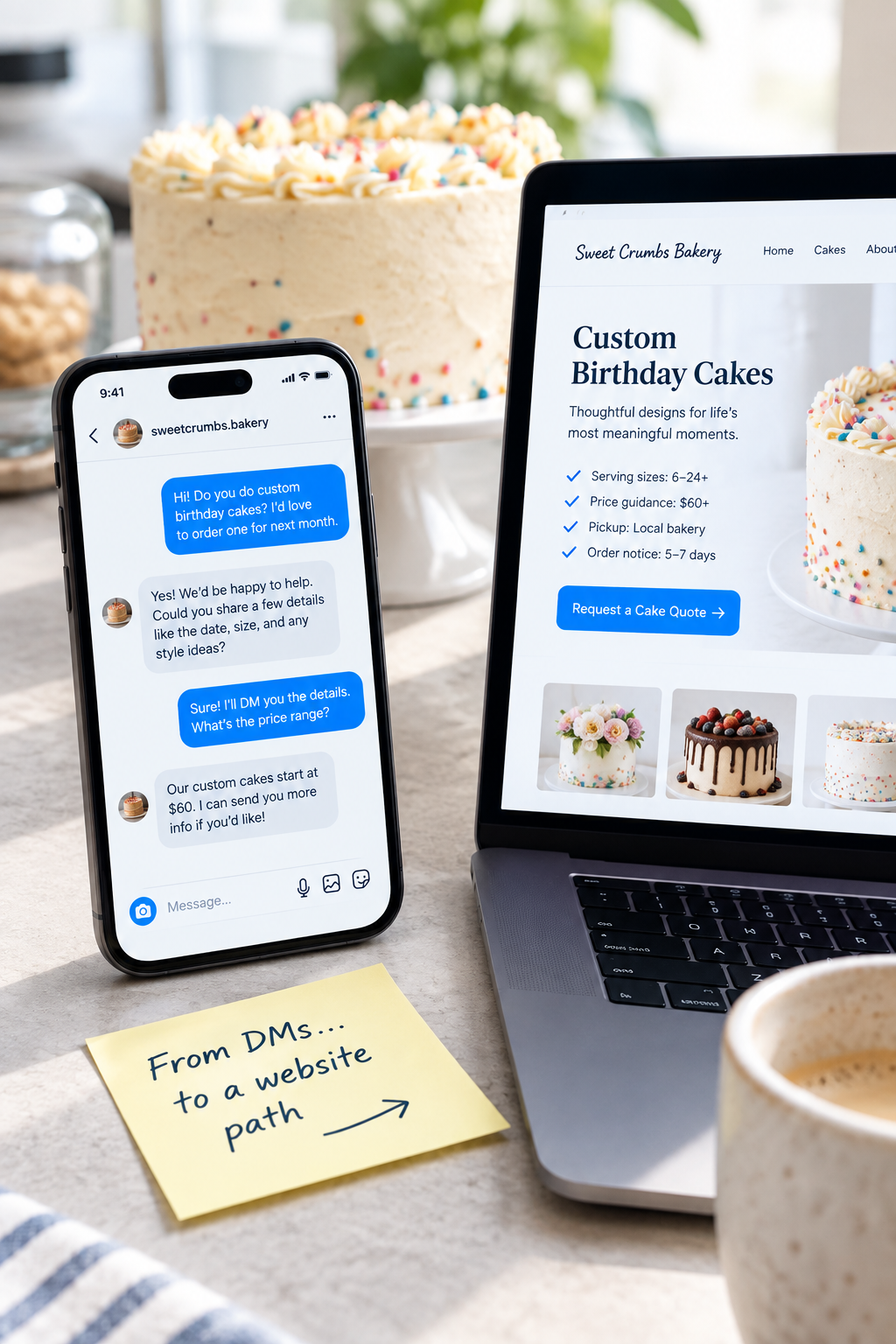
An illustrative bakery example
A custom cake page could include serving-size options, price guidance, pickup location, ordering notice, design limitations, and a request form. The form might ask for the event date, number of servings, desired style, and contact details.
The button could say Request a Cake Quote. Nearby text should explain that submitting a request does not reserve the date and describe how the bakery confirms an order.
That distinction matters. “Order Now” would be misleading if a staff member still needs to check capacity and approve the design.
Match the next step to how you actually sell
Not every business needs instant checkout. Choose the simplest route that fits the decision you need to make.
- Direct booking: Use this when the service, duration, and available slots are predictable. Show relevant preparation and cancellation information before confirmation.
- Request first: Use this when scope, suitability, or capacity needs review. Collect enough information to assess the request without turning the form into homework.
- Purchase: Use this when the product, price, fulfillment, and availability can be presented accurately before payment.
- Waitlist: Use this when customers genuinely cannot book or buy yet. Explain what an entry means and avoid implying that it guarantees a place.
If an external tool handles booking or payment, your website can explain the offer before handing people over. Check that the destination opens the correct service, not a generic directory where they must start searching again.
Leave a contact option for questions the page cannot answer. The goal is fewer unnecessary conversations, not a business that refuses to talk.
Connect your posts to the right page
Once the destination works, update the entry points customers actually use: your profile link, relevant pinned content, available action buttons, and saved replies.
Make the wording specific. “View custom cake options and request your date” tells customers more than “Link in bio.” Where a platform supports direct clickable links, send people straight to the relevant page.
You can still respond warmly to messages. A saved reply might say:
“Thanks for asking! Our cake options, price guidance, and request form are here. Send your date through the form and we can check availability. If you are unsure which size to choose, tell us your guest count and we will help.”
Answer the person's question when you can. A link should make the conversation easier, not feel like an automated brush-off.
Avoid putting essential buying instructions exclusively inside a social post. If the instructions change, update the website as the main reference point, then correct active posts and saved replies that contradict it.
Keep service requests separate from marketing signups
A customer who requests a quote has asked about that quote. Do not assume they also want ongoing promotional emails or texts.
If you offer an email signup, make it a separate, optional choice with a clear reason to subscribe, such as seasonal order announcements or new workshop dates. Follow the consent and unsubscribe requirements that apply to your business and customers.
Do not require newsletter membership to see basic prices or submit an ordinary inquiry. And do not move sensitive client details from DMs into a general-purpose form without considering privacy and security requirements.
Test the path inside the social app
Open your profile on your phone and follow the link as a customer would. Social apps may open pages in an in-app browser, so a successful desktop test is not enough.
- Can you understand the offer without logging into a social account?
- Does the page still make sense without the original caption?
- Does the booking, request, or payment step work inside the app's browser?
- Does the customer see an accurate confirmation and know what happens next?
- Can your team find the submission and take responsibility for it?
Use clearly labeled test details and coordinate any test purchase or booking so you do not accidentally consume a real appointment. For a deeper delivery check, use the process in How to Test Whether Your Website Leads Actually Reach Your Team.
Measure whether the conversation got easier
Keep a simple baseline before you change the path: how many inquiries concern this offer, which questions repeat, and how many requests are suitable to move forward.
After launch, review those same points over a comparable period. If your analytics support it, distinguish visits from your social profile from other traffic, but do not treat link clicks as completed bookings.
Look for practical signals: fewer repeated setup questions, more complete requests, and fewer customers who mistakenly think a request is confirmed. Low-volume businesses may need several weeks to spot a useful pattern. One quiet weekend is not a verdict.
If people still ask the same question, check whether the page answers it clearly. If they understand the offer but cannot finish, inspect the next step before rewriting everything.
Make one offer easier to buy this week
Choose one recurring DM conversation. Give it a clear website destination. Connect the relevant social links, test the complete journey, and assign someone to keep the details current.
You can keep the personality, photos, and friendly chats that make social media work. Your customers just should not need a conversation with you to find every basic answer.
Want help choosing what to move out of your DMs first? Contact SolcoMedia with your website, social profile, and the customer question you answer most often. We can discuss a practical next step for that offer.