You added a useful service page to your website. It opens perfectly when you send someone the link. But you cannot find it in Google, and now you are wondering whether the copy needs another round of keywords.
Hold that rewrite. A page that works in your browser is not necessarily a page Google has indexed. And an indexed page is not guaranteed to appear prominently for the searches you care about.
Those are different problems with different fixes. Here is how to work out which one you have before paying for the wrong solution.
First, separate indexing from ranking
Think of the process in three parts:
- Discovery: Google learns that a URL exists, often through a link or sitemap.
- Crawling and indexing: Google attempts to access the page, processes it, and decides whether to include it in its index.
- Ranking: Google decides when and where an indexed page should appear for a particular search.
If your boiler repair page is indexed but does not appear for a competitive local search, that is not necessarily an indexing problem. If Google cannot access the page at all, improving its headline will not solve the access issue.
Typing the page title into Google, or searching with the site: operator, can provide clues. Neither is a complete indexing audit. For a website you manage, start with Google Search Console.
Inspect one important URL, not your entire website
Choose a page that should help bring in business: a core service, an appointment offering, or a genuine business location. Skip internal search results, thank-you pages, and campaign duplicates.
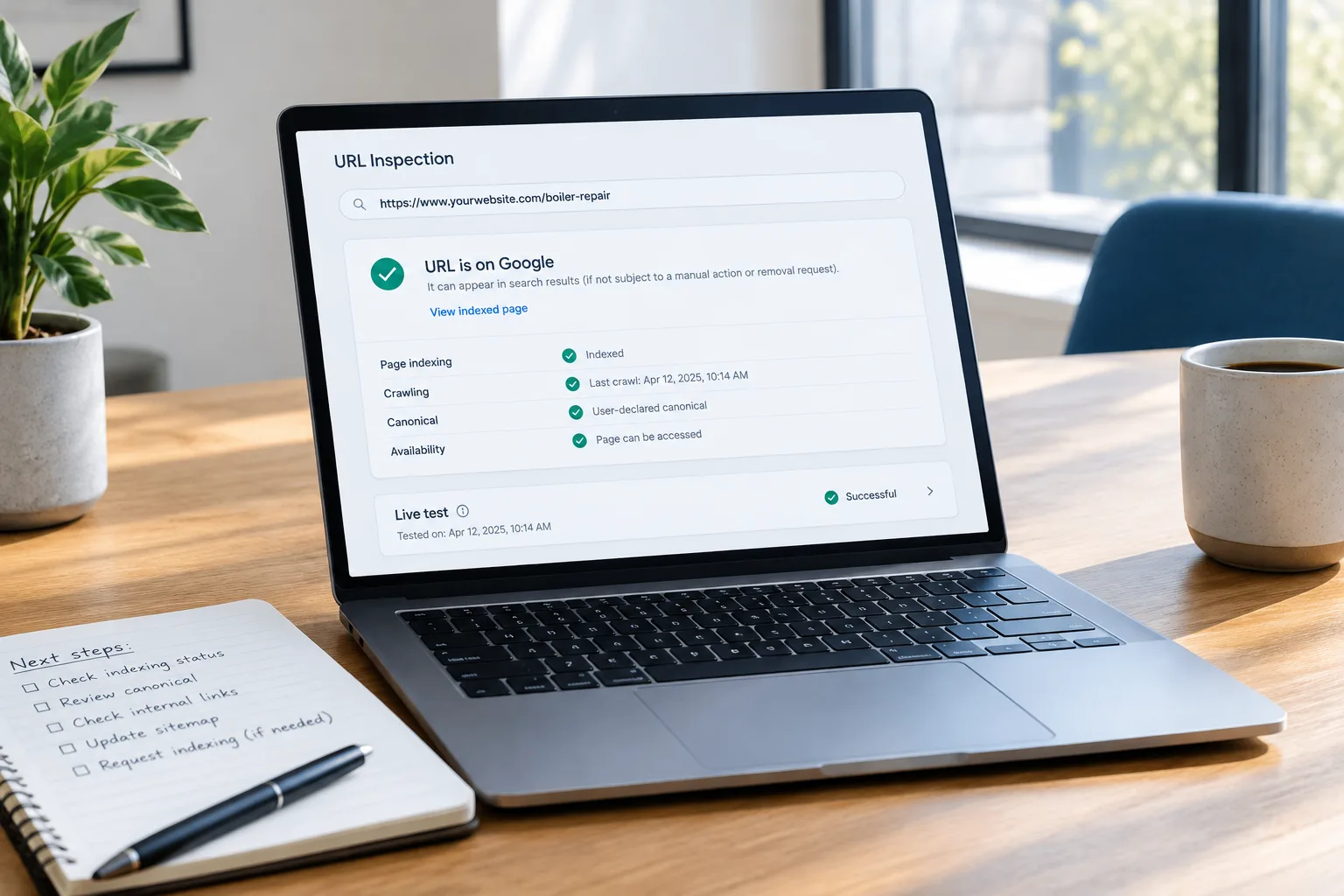
Open your verified website property in Search Console and use URL Inspection. Enter the exact public address, including the correct domain version and page path. If you do not have access, ask whoever manages your website to arrange it through an account your business controls.
Record the inspection result before changing anything. You want to know:
- Whether Google reports that the URL is indexed.
- Whether crawling or indexing is blocked.
- Whether Google has selected a different canonical URL, meaning the preferred version of substantially similar pages.
- When the page was last crawled, if that information is available.
The indexed report reflects Google's stored information. A live test checks the page's current accessibility and some indexing conditions. A successful live test does not guarantee indexing or search visibility.
Match the result to the right next step
The URL is indexed
You probably do not need an indexing repair. Check whether Google selected the intended canonical page, then look at the page in Search Console's Performance report.
Impressions mean the page appeared in reported search results, even if you cannot reproduce those results yourself. Search results vary, and low-volume searches may provide limited data.
For an indexed service page with weak visibility, investigate whether it clearly matches what customers are searching for, describes a service you actually provide, and is linked from relevant parts of your website. Repeatedly requesting indexing is not a ranking strategy.
A noindex instruction is excluding the page
A noindex instruction tells search engines not to include a page in their index. It can be intentional for private-purpose or low-value pages. It can also be left behind when a development site becomes the public website.
Ask your provider to check both page-level settings and site-wide settings. The instruction can appear in the page code or an HTTP response header, so the visible content editor may not tell the whole story.
Only remove it if the page belongs in search. Booking confirmations and customer account pages do not need to become public search destinations. Also, noindex is not a substitute for passwords or proper access controls.
Crawling is blocked, the page fails, or login is required
Google needs access to the public content. A robots.txt rule, server error, security tool, or login screen can prevent that access even when the page works for someone already signed in.
Open the page in a private browser window as a basic check, then have your provider investigate the actual response and Search Console's findings. A private-window test cannot prove that Googlebot has access.
Do not delete robots.txt or switch off website security as a blanket fix. Ask for the specific rule or failure to be identified and corrected. Blocking crawling also is not a reliable way to keep a URL out of search.
Google selected another canonical page
This often happens when several URLs contain the same or very similar material. The selected version may be correct, such as a clean service-page URL instead of a tracking version.
If it is wrong, ask your provider to review canonical instructions, redirects, sitemap entries, and internal links together. These signals should support the same preferred address. A canonical instruction is a signal, not a guarantee that Google will choose that URL.
For example, if a distinct commercial cleaning page points to your general cleaning page as its canonical, investigate that mismatch. But if two pages really offer the same information, combining them may be more useful than trying to get both indexed.
The page was discovered or crawled, but is not indexed
This is not automatically a penalty, and the status alone does not establish the cause. Google may not have crawled a discovered URL yet, or it may have crawled a page without choosing to index it.
Check whether the page:
- Is linked from a relevant service overview or another useful, accessible page.
- Appears in your XML sitemap under its preferred URL.
- Loads its main content reliably, including on mobile.
- Answers a distinct customer need rather than repeating another page.
- Contains finished information rather than a heading and a promise to add details later.
A sitemap helps discovery. It does not force indexing. Neither does adding several paragraphs of filler.
Make the page worth finding
Consider a hypothetical heating company with a new boiler repair page. Its only text says, “We provide professional boiler repairs. Contact us today.” The page is technically accessible, but it barely helps a customer choose what to do.
A useful revision might explain which systems the company works on, its actual service area, how a repair request is handled, and any genuine limits on availability. Link to that page from the heating services overview.
That is a substantive improvement, not a word-count exercise. It still does not guarantee indexing, but it gives the page a clearer purpose for both customers and search engines.
Send your provider a repair brief, not a guessing game
Copy this structure into an email:
- Page: The exact URL that should appear in search.
- Business purpose: The service or customer question it covers.
- Evidence: The URL Inspection result and the date checked.
- Expected outcome: Whether this URL should be indexed independently or consolidated into another page.
- Requested check: Access, indexing instructions, canonical selection, internal links, and sitemap inclusion.
- Follow-up: Who will make the change, verify it, and check the result later.
After a genuine fix, use the live test to check relevant technical conditions and request indexing if appropriate. Google may take time to revisit the page, and a request does not guarantee inclusion. Repeated submissions will not speed things up.
Your next move: diagnose one page before changing ten
Pick one commercially important URL and inspect it. If it is indexed, focus on relevance and search performance. If it is not, use the reported reason to choose a specific repair.
If you would like SolcoMedia to review it, request a website review and include the URL plus any Search Console findings. That gives the conversation a useful starting point: what is stopping this page from doing its job?